The LMS now supports integration with Litera CE Manger (CEM), enabling seamless tracking, validation, and reporting of learning activities completed in the LMS for compliance purposes within CE Manager. What Each System Does:•The LMS manages learning delivery and the user experience. Users access and complete their learning within the LMS. When a user completes a course or attends an event that is "Tracked in CE Manager", the LMS captures and sends the learning history to CE Manager •CE Manager manages compliance requirements, accreditation, and credit tracking. Once data is received from the LMS, CE Manager applies credit allocation, license validation, and compliance rules. Compliance records are updated accordingly and all compliance reporting and audit capabilities are managed entirely within CE Manager. This integration ensures a seamless flow of course and event completion data from the LMS to CE Manager, minimizing duplicate administrative effort. How the Integration Works:•The LMS communicates with CE Manager through secure API endpoints to exchange learner training data. •The user's email address is used to match records in both systems. User learning data is synced when the user exists in both the LMS and CE Manager and the email matches exactly in both systems. •The LMS sends course details (course identifier, completion status), event (session) details (attendance completion) to CE Manager. •User accounts and personal data are not shared between the LMS and CE Manager. Background Processing and Data IntegrityThe integration between the LMS and CE Manager uses automated checks to keep data consistent. It regularly validates course and session mappings, identifies missing or out-of-sync records, and retries or resolves issues when possible. This helps ensure accurate and reliable data transfer between systems. Roles and ResponsibilitiesThe LMS and CE Manager administrator responsibilities for this integrated system can be itemized as follows: •LMS: Administrators manage course and event creation and management, learner experience, and completion tracking. •CE Manager: Administrators configure compliance, credit assignment, compliance validation, regulatory reporting, and audit tracking. CE Manager Integration Configuration and Setup:To enable CE Manager integration within the LMS, administrators must complete the following: •Provide the API credentials and endpoint configuration details to Intellek. Note: These details, unique to your CE Manager instance, are obtained by the client from CE Manager and provided to Intellek. •Activate the integration toggle. 1.In the LMS, go to the Settings page and enter the CE Manager API details provided by CE Manager: : oAdmin Email (CE Manager administrator email) oAPI Client ID oAPI Client Secret oAPI Authorization URL oAPI Base URL 2.Check the 'CE Manager In Use' box. 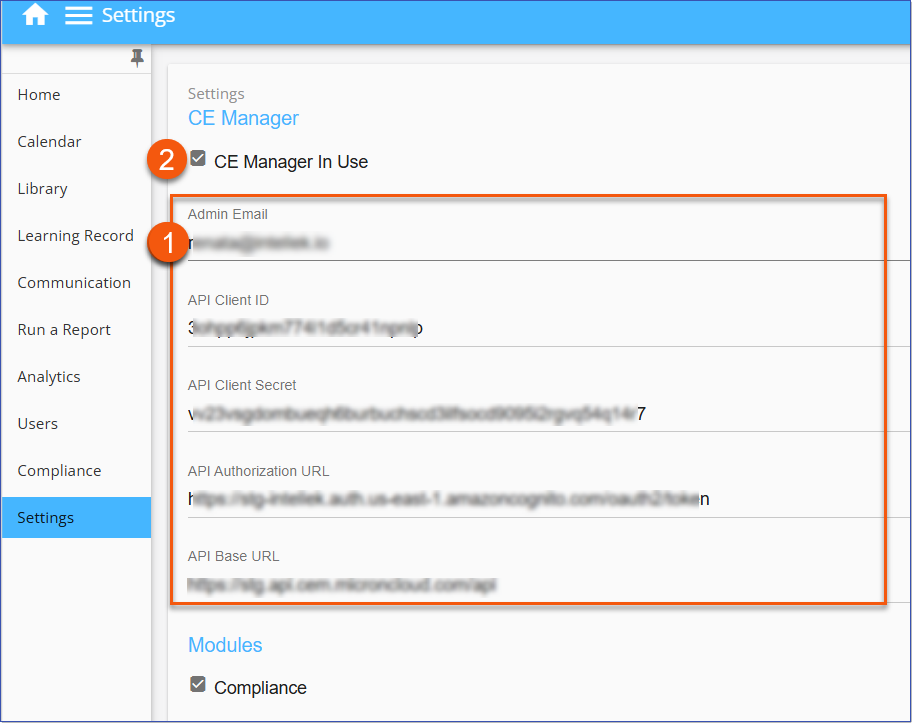 Settings > CE Manager Settings
|