Clients upgrading to LMS v4 and using SSO must add your new LMS v4 callback URL to their SSO application to ensure proper functionality after the upgrade is complete. Refer to the instructions below for supported SSO providers.
In addition, the LMS v4 callback URL must be added to your Trusted Sites security zone and Pop-up Blocker exception lists.
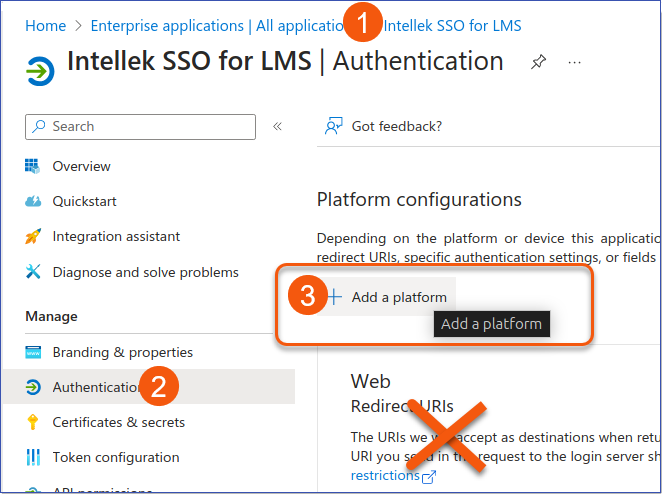
Entra ID (previously Azure AD) SSO Callback Configuration
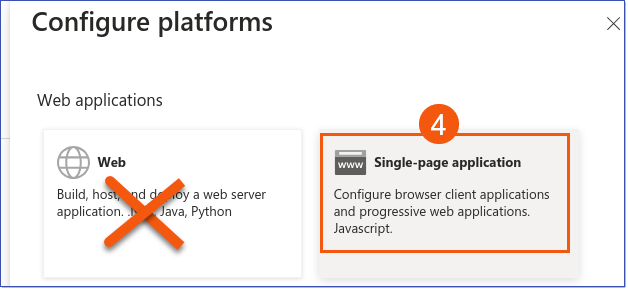
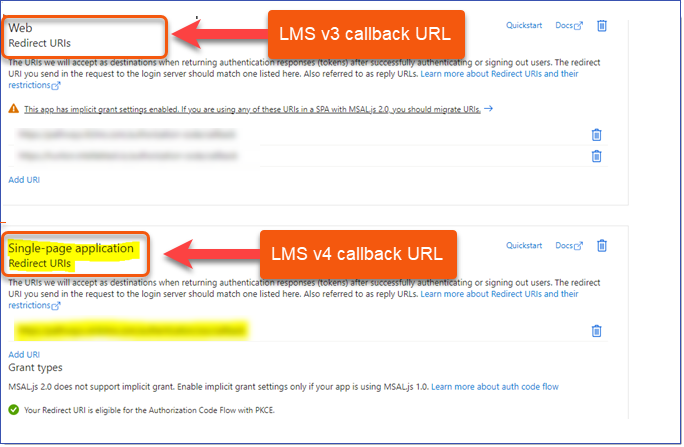
The new callback URI is designed for a Single-page application (SPA) in LMS v4, which is different from the Web application method used in LMS v3.
Note that this callback can be added in advance of your upgrade and in addition to your LMSv3 callback.
Sample List of Redirect URIs:
OKTA SSO Callback Configuration
ADFS Single Sign-On
not available at this time
|
